1. Get your basic wiring down:
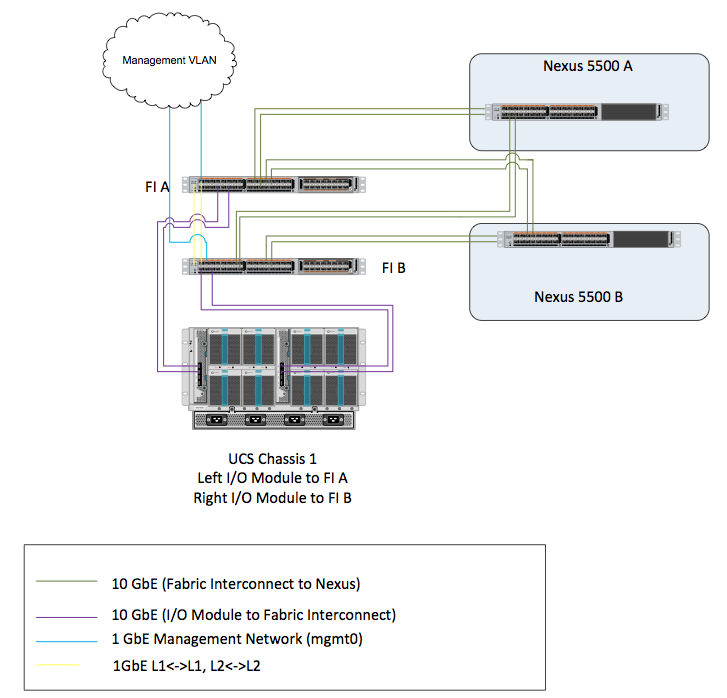
2. Get management IP addresses
Make sure you have at least 3 IP addresses for the Fabric Interconnect (FI) management network. You will also need an IP address for each blade's CIMC (translation: From HP this is the iLO IP address, From IBM this is the IMM IP address). The CIMCs and the 3 IP addresses for the FIs should be in the same subnet/VLAN. If I had 8 blades then I would need 11 IP addresses.
It is easy to get confused on this because people look at the management port coming from the back of the Fabric Interconnect and think its just the management port of the Fabric Interconnect. However, internally there is an ASIC that performs level 2 switching so all the blade CIMCs go up through this port as well. That's why you need to keep this on the same network and VLAN.
3. Cable the chassis to the Fabric Interconnects.
We usually put all the ports on the left side of the back of the chassis up to the top fabric interconnect and all the ports on the right side to the bottom fabric interconnect. When I first saw this I thought: Where is the redundancy? It seemed to me that each I/O module in the back of the chassis should be redundantly cross connected to each FI. Well, that's not how it goes. Look at it like those cables going from the I/O modules (IOMs) to the FIs are just part of the backplane. Its just that UCS externalizes the backplane to be able to manage more chassis with one management infrastructure. (One of the big selling points of UCS!
No mini-racks!)
4. Connect 10GbE uplinks
The 10 GbE connections from the FIs to the main switches can cross connect and you can create a VPC across them. This should get you started.
With my Mac, I connect a
USB serial adapter to the serial cable to the serial port on the top FI. (which I call FI-A) From there I run:
screen /dev/tty.usbserial
and press enter. Then I'm in. I still have issues with this on my Mac where I need to change USB ports to make it work. But eventually, I'm always able to get something.
From here I get:
Enter the configuration method. (console/gui) ? console

  Enter the setup mode; setup newly or restore from backup. (setup/restore) ? setup

  You have chosen to setup a new Fabric interconnect. Continue? (y/n): y

  Enforce strong password? (y/n) [y]: y

  Enter the password for "admin":
  Confirm the password for "admin":

  Is this Fabric interconnect part of a cluster(select 'no' for standalone)? (yes/no) [n]: yes

  Enter the switch fabric (A/B) []: A
  ...
Then it asks for IP address information, etc. Its pretty easy. It also asks for a system name. I usually give it a name like UCS0001, so that you can buy up to 9,999 UCS systems before you have to change your naming convention. ;-) Each FI gets its own IP address and then there is a Virtual IP address that they both share (remember: this should be on the same VLAN, and this is why you need 3 IP addresses for the FIs).
The system will reinitialize and settings will take effect. Make sure you can ping this IP address before moving on. You may get an error like: "Clustering services are not available on other fabric interconnect". Don't worry, just move along.
Same thing as the first, but when you first log in, you'll give it an IP and netmask and then it will ask you to join the other FI in its cluster. You'll enter the password and you'll be up!
7. Log in!
Point your browser to the Virtual IP address and you'll open a Java JNLP program and start administering your UCS system. Wasn't that easy?
Now what?
This section deserves a blog of its own. Basically, you'll start setting up policies and pools, VLANs, VSANs, etc. Then create a service profile templates from those resources. Once this is complete, you are ready to install your OS and BAM! You are up and running.